Overview
A no code, drag-&-drop interface for your complete flow orchestration. Onboarding flows often include numerous steps and checks, are complicated with conditional logic and are difficult to maintain and update. With DigiStudio, companies can now build and update fully customised onboarding experiences for their firm and deploy them in real-time. DigiStudio embeds:
- External services through APIs (Plugins)
- Conditional workflow creation for A/B testing and handling multiple flows
- Options to invoke flow templates within the application or send links directly to your customer.
- Capability to embed and combine functionality from the following products in a single workflow
- Digi Sign
- Digi Docs
- Digi KYC
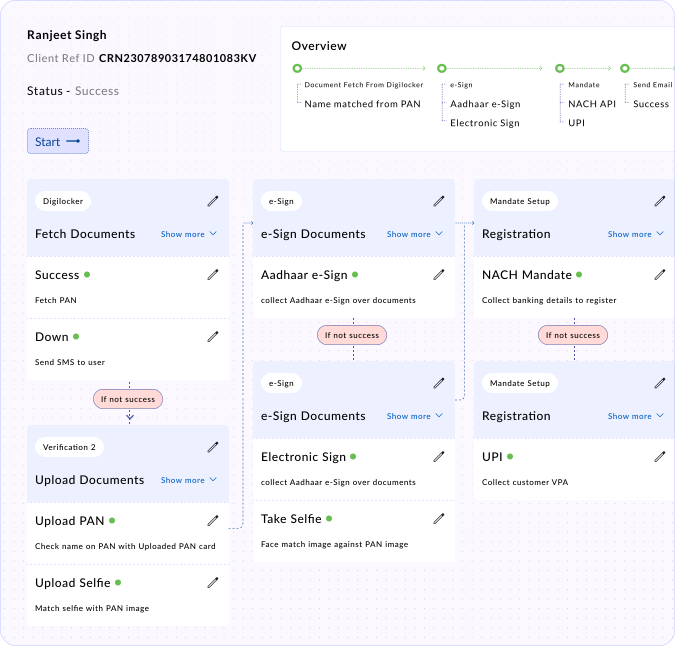
Capabilities of DigiStudio
A workflow on the Digio platform can have any number of steps, with each step being one of the following:
| Capability | Business Use Case | Business Scenarios |
|---|---|---|
| Digilocker | Allows verification of any document present in DigiLocker account e.g. Aadhaar, PAN, Voter ID, etc. | Allows a user to pull one of their documents hosted on Digilocker. For more info : https://digilocker.gov.in/ |
| ID Proof | Allows capturing, validating and extracting information from : PAN, Aadhaar, Driving License, Indian Passport, Vehicle Registration Card | Allows the user to upload an image of a specific government issued ID document |
| Selfie | Allows capturing user’s selfie photograph. | Allows the user to take a live photograph of their face with built in validations of liveness detection |
| Video | Allows video verification. | Allows the user to record a 10 second video performing any relevant action as instructed. E.g. speaking an OTP shown to them which is recognized from audio using ML speech to text. |
| Agent Assisted Video | Allows Video-In Person Verification (VIPV) | Allows a two way KYC/onboarding video call between the customer and Corporate’s agent. The call may have specific instructions for actions to be performed by the customer and separate specific instructions for the agent |
| Signature | Allows a specimen signature capture by either clicking a photograph of signature or drawing it on on screen canvas | Allows the user to upload an image of their signature for fulfilling specimen signature requirement. |
| Cheque | Allows cheque upload with optional Bank Account Verification | Allows the user to upload an image of a cheque from which bank account details may be fetched and verified. Refer penny drop for verification process |
| Penny Drop | Allows bank account verification | Allows a user to verify their bank account by making a transaction of 1 INR (Standard) or any amount between 1 and 2 INR (Custom) |
| Generic | Allows user consent and uploading any file required for KYC record. | This is used to perform one of the below: 1. Take user’s consent on a message/declaration 2. Allow user to upload a file without any validations/OCR being performed on it. Eg: Salary slips, ITR, Utility Bills, GST Certificate, etc |
| Aadhaar Offline | Allows verification of Aadhaar number | Allows a user to verify their Aadhaar. |